
Best Practices for Live Streaming Your Team's Game
Live streaming in TeamSnap ONE is how you bring the game to everyone who couldn't make it — grandparents two states away, a parent stuck at work, a sibling at their own practice.
The good news is it's simple: open TeamSnap ONE, tap Go Live on your event, and you're streaming. The better news is that a few minutes of prep before kickoff, tip-off, or first pitch is the difference between footage your team actually wants to rewatch and a stream that drops out at the worst moment.
This guide walks through what to do before you leave the house, how to get set up at the field, and what to keep an eye on once you're live — whether you're streaming from your phone or running an XbotGo Falcon auto-tracking camera.
Before You Leave
- Charge Everything: Live streaming drains your phone battery faster than normal use. Start fully charged and bring a portable battery pack — a dead phone is the most common reason streams end early. If you're using an XbotGo Falcon or another external camera, make sure it's charged too. It gives you around three to four hours, which covers most games, but not if it arrives half empty.
- Check your Data: Streaming uses mobile data if you're not on Wi-Fi. A one-hour stream at 1080p uses roughly 2–3 GB. Make sure you have enough headroom, or plan to use your phone's hotspot.
- Enable Hotspot in Advance (XbotGo Falcon users): If you're connecting your XbotGo Falcon to your phone's hotspot, turn your hotspot on before you leave and confirm it's working. Setting it up cold at the field adds friction you don't need right before a game.
- Do a Test Stream. TeamSnap ONE includes a Test Live Stream Mode that lets you run a completely private stream to check your setup ahead of time — no one is notified, and nothing is recorded. Use it to confirm your video quality, framing, and connection are solid before any of it matters. You'll find it on the Account Menu screen. See Test Live Stream Mode for the full walkthrough.
At the Field
- Arrive Early: Give yourself at least 10 minutes before the game starts — more for a first-time XbotGo Falcon setup. Connection and configuration take time, and you don't want to be troubleshooting when the whistle blows.
- Set Do Not Disturb: Incoming calls and notifications can interrupt your stream. Set your phone to Do Not Disturb before you go live.
Please Note: If you're using an XbotGo Falcon, your phone and camera need to be on the same Wi-Fi network. Your hotspot is the simplest way to guarantee this. See Connect an XbotGo Falcon camera to TeamSnap ONE for setup steps.
- Wipe your Lens: Before you start, give your phone's camera lens a quick wipe with a soft cloth. Smudges and dust blur the picture more than most people realize.
- Protect Your Gear: If you're streaming outside, a case or cover helps shield your phone from sun, rain, and the occasional drop.
- Pick Your spot and Think About Lighting: Where you set up has a big impact on picture quality.
- Streaming From Your phone: Position yourself roughly level with the center of the field or court, far enough back to see as much of the playing area as possible. Sideline center, elevated if you can manage it, is usually the best spot. Position yourself so the sun or main light source is behind the camera — lighting up the players — not shining into the lens. Avoid zooming; moving closer gives you better quality than digital zoom.
- Using an XbotGo Falcon or An External Camera With Tracking: Place the camera at the center of the field on a tripod, with a clear line of sight to the playing area. These cameras track automatically, so your job is to get them positioned and pointed in the right direction — not to follow the action yourself. Keep your phone within roughly 20 yards of the camera while streaming; beyond that, the connection can become unreliable.
- Keep it Steady (phone streamers): A shaky shot is hard to watch. A tripod or fence mount is the easiest fix. If you're holding the phone, tuck your elbows into your sides to steady your hands.
- Start a Few Minutes Early: Go live before the game officially begins. It gives viewers time to tune in and confirms everything is working before the action starts.
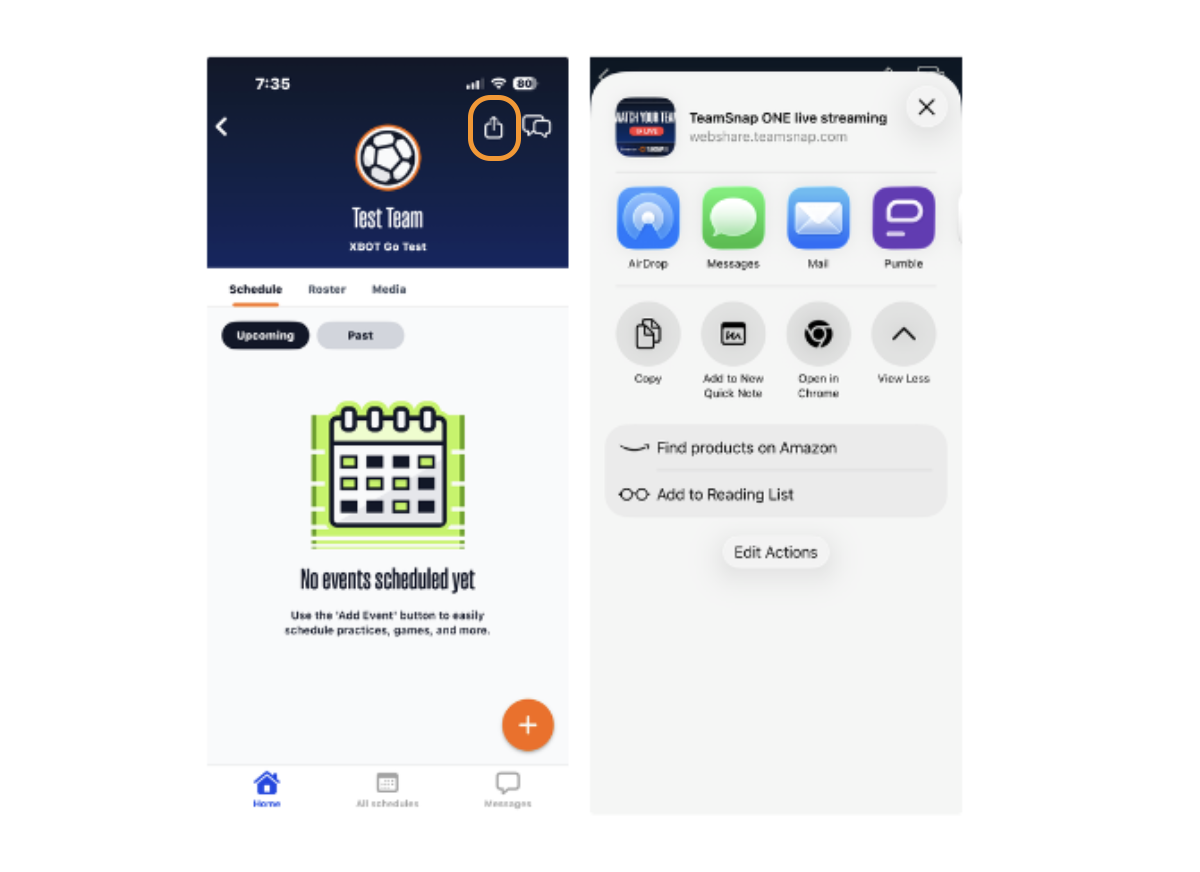
- Share a Link to Your Stream: You do not have to wait to start your stream before you can share a link to where your stream will be viewable by family and friends.
- When you click on your team, you'll see a share button in the top-right corner. This will allow you to share a link (that is the same throughout the season) for your family and friends to bookmark for access to all live streams on your team in real time.
During The Game
- Streaming From Your Phone: Keep the game in frame and pan slowly — a wide, steady shot is far easier to watch back than one chasing the ball. If it's windy, find a sheltered spot if you can; wind noise makes audio rough, and muting your mic is a reasonable call when it's unavoidable.
- A Quick Word on Commentary. If you talk while you stream, remember that everyone watching can hear you. Keep it supportive — it's youth sports, and the kids, the refs, and the other team's families are all part of the picture.
- Using an XbotGo Falcon: Once you're live, the camera handles tracking on its own. Use the pan and tilt controls in TeamSnap to fine-tune the framing whenever you like — it won't interrupt the stream. Glance at the picture every 15 minutes or so to make sure it still looks right.
- Watch Your Connection: If you see a warning about stream quality, your data signal has probably weakened, and you may want to end your stream, switch networks, and restart at a lower quality.
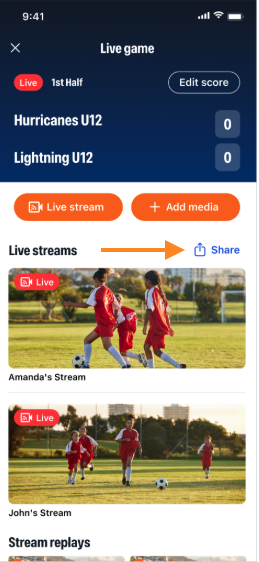
- Share Your Stream: Once your stream is live, everyone on your team will get a chat notification. In addition, contacts will be able to access a stream from the event details page. We also understand that there may be family members or supporters who do not have a TeamSnap ONE account but want to follow along.
There is no restriction, and the streamer, or any contact on their team, can share the game with anyone with a public web link by following these steps:
- During an active game, any team contact can open the game event details in the app or on the web.
- They can generate a unique web URL via the "Share Live Stream" button and share via text, email, or social media.
Stay Live Until the End: Replays are generated from the full stream. If you stop early, the replay cuts off at that point. Stay live through the final whistle.
After the Game
Your stream is automatically saved as a replay. TeamSnap+ subscribers can watch it back on demand, jump to specific moments, and create clips. If you don't have TeamSnap+, the replay is still processed — it just isn't viewable until a subscription is active. You can start a trial to see what you may be missing out on.
If something went wrong — the stream dropped, the camera disconnected, or the footage looks off — see Troubleshooting your XbotGo Falcon camera for next steps.