
How to view a live stream
TeamSnap live streams can be watched in two different ways, depending on your relationship to the team and whether you prefer to watch in the app or on the web.
In this article we will cover:
1. Viewing as a Team Contact (In-App)
If you are a contact on the team roster, the easiest way to watch is through the TeamSnap ONE app.
How to Watch a LIVE Stream
- Open your TeamSnap app.
- There are several ways you can get to a live stream
- From the home tab
- From the All Schedules tab
- From a game details screen
- From a chat notification
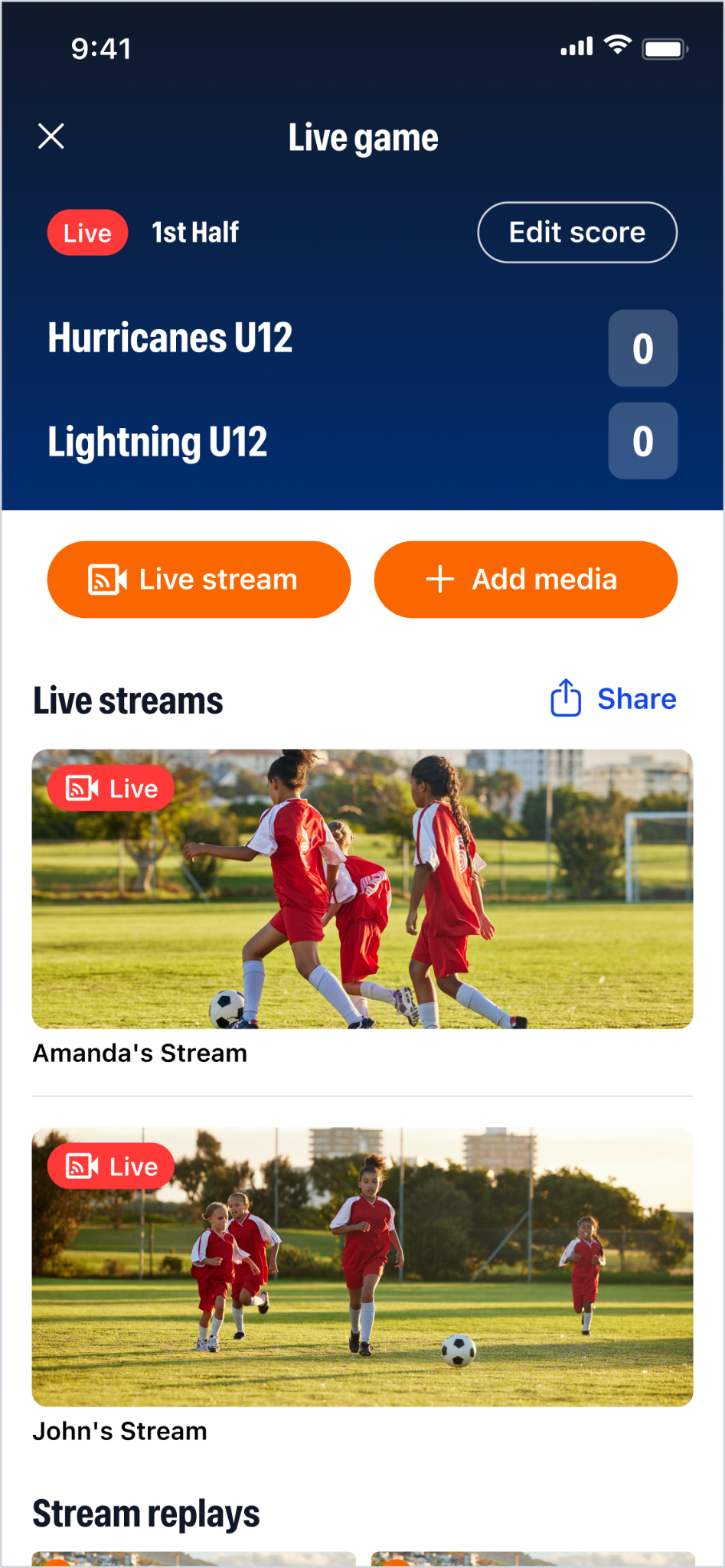
- If there is an available stream, you will see a clear button on each of the options above. This will take you to the game zone where you can see the game's score, live stream(s), and media.
- If the game is actively streaming, you will see a prominent preview.
- Tap this to start watching.
- You can also copy the link and watch it on another device.
| Live Stream Feature | Details |
| Who Can Watch? | Any contact on the team roster (players, parents, coaches, etc.). |
| Scoreboard | You can see the real-time scoreboard overlay, but you cannot update or edit the score. |

How to Watch a Replay (Past Stream)
After a live stream has ended, the recording is archived as a replay. To watch a replay, navigate to the live gaming hub that is accessible through your team's schedule.
| Replay Feature | Details |
| Access | Watching a stream replay requires a TeamSnap+ (TS+) subscription. |
| Viewing Location | Replays are viewed within the TeamSnap mobile app. |
| Lock Icon | If you see a lock icon 🔒 on a replay, it signifies that the content is only accessible to users with an active TeamSnap+ subscription. |

2. Viewing as a Guest or Non-Contact (Web Link)
If you want to share the game with family, friends, or the opposing team who are not on your TeamSnap roster, a team contact can share a public web link.
Sharing a stream before the game
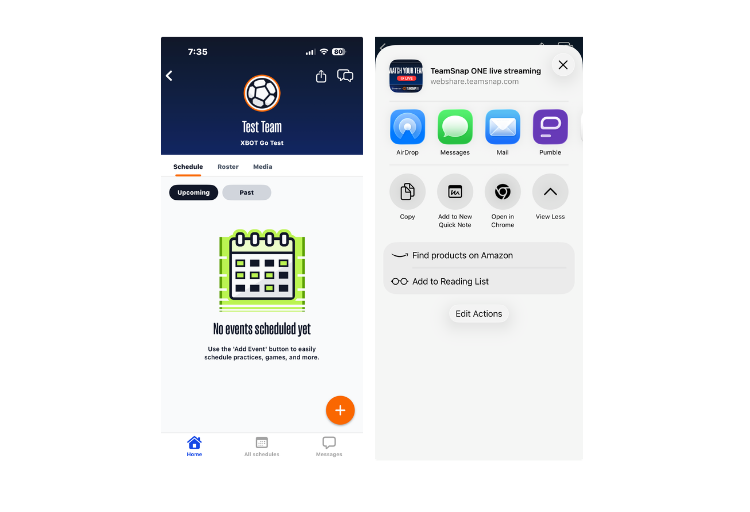
- Before a game starts, if you click on your team, you'll see a share button in the top right corner. This link will be the same throughout the season, so you can ask family and friends to bookmark it. Any live streams will show up here in real-time.
- Clicking on that button will lead to a pop-up.
Sharing a stream during the game
- During an active game, any team contact can open the game event details in the app or on the web.
- They can generate a unique web URL via the "Share Live Stream" button.
- They can share this unique URL with you via text, email, or social media.
What a Guest Viewer Sees (Public Web Page)
Guest viewers who click the shared link will be directed to a public web page that shows the team's streaming activity.
| Live Stream Feature | Details |
| Who Can Watch? | This page is publicly available. Anyone with the unique team link can view the stream. |
| Live Games | Users can watch any active live streams for the team. |
| Upcoming Games | Users can see upcoming games scheduled for the team. |
| Past Games/Replays | Once a live stream ends, access to the video is immediately removed from this public page. |
| Score | Viewers can still see the final score for any games that ended as of today on this page. |
| Viewing Location | Only available on a web browser (desktop or mobile). |
📺 Casting to a TV
Depending on the mobile device or web browser you are using to watch the live stream, you might be able to cast the video feed to a compatible smart TV or casting device (like a Chromecast or Apple TV).
This ability depends entirely on your specific device and whether your TV supports the necessary casting features.
Please refer to your device's instructions for knowing if they support this feature and how to activate it if they do.